How to Build an LTF (Lease-to-Forward)
This is the product for when timing, not financing, is the problem: you know what you want to sell and roughly when, but you don't want the next few weeks or months of price swings to change the outcome. You set the amount, pick a delivery window measured in hours, days, or months, and pay a bundled fee up front — there's no schedule of installments to track afterward, just a locked price and a date.
Step 1 — Choose your asset and amount
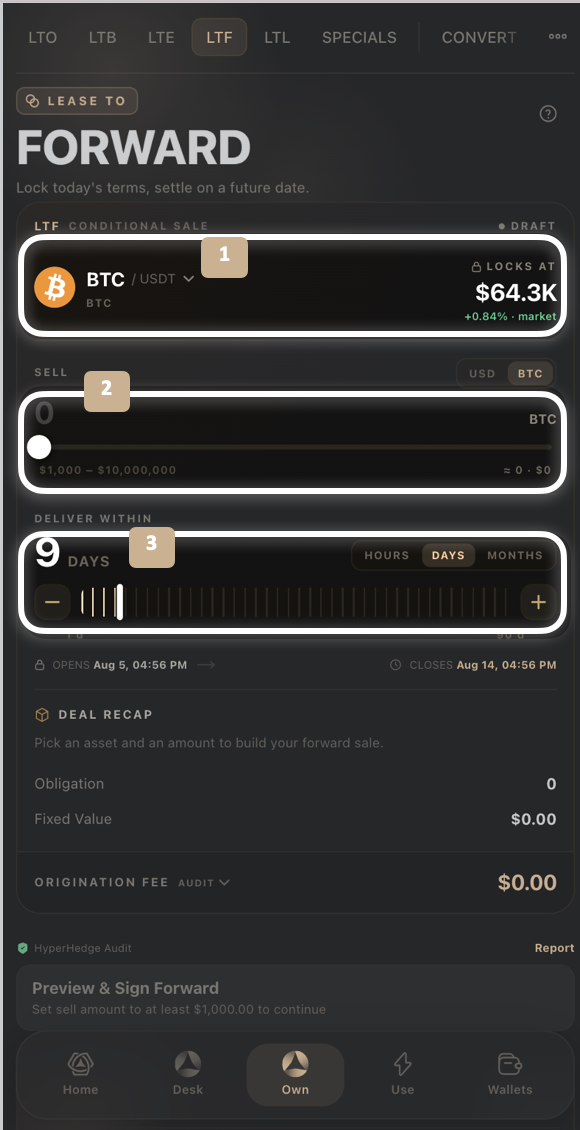
From the Own tab, select LTF.
Pick the asset pair at the top (for example BTC/USDT). The price it Locks At is shown along with the live market change.
Under Sell, toggle USD or the asset's own unit, then set your amount with the slider.
Step 2 — Set your delivery window
Toggle Hours, Days, or Months for Deliver Within.
Use the slider or +/- buttons to set the exact window. The Opens and Closes dates and times update to match.
Step 3 — Review the Deal Recap
Deal Recap shows your Obligation (the asset amount) and Fixed Value (the locked USD value). The Origination Fee section breaks down into:
Carry Cost — the cost of holding the position over your delivery window
HyperHedge Fee — the hedging cost for the window
Platform Fee — BitLease's fee for the forward
Bundled Total — all three combined, due at signing
Step 4 — Preview & sign
Check the HyperHedge Audit indicator and tap Preview & Sign Forward to confirm.
Tracking your forwards
Your Forwards at the bottom of the LTF tab shows how many are Open and Settled, with their combined Value. Tap Forward Ledger for the full history.
Good to know:
A longer delivery window increases your Origination Fee, since Carry Cost and HyperHedge Fee are both time-based.
There's no recurring installment on an LTF — the entire fee is bundled and due at signing.
Need Help?
If you encounter issues during account creation, contact BitLease Support:
Email: support@bitlease.com
Subject: "LTF Forward Issue"
Include: A description of the problem, any error messages, and steps you've already tried.
Response Time: Within 24 hours.
For urgent security concerns, email: security@bitlease.com.
Related articles: How to Build an LTE (Lease-to-Elect) · How to Build an LTL (Lease-to-Liquidity) · A Tour of the Own Tab